
The most common automation handover in the world looks like this. A Loom link, a Google Doc with eleven screenshots, and a Slack message that says “let me know if anything comes up.” Everyone agrees the project went well. Three weeks later something comes up, and nobody in the client’s office knows where to look.
This article is about that gap. Not the handoff from sales to delivery, and not the one where a chatbot passes a conversation to a human agent. This is about transferring a working automation to the people who now have to live with it.
Handover is a standing part of how we close software projects. Credentials move, access changes hands, documentation gets written for people who were not in the build, and the client has to run the thing without us. The checklist below applies that same discipline to automated workflows, and it is written for both sides of the table. By the end you will have a single pass or fail test to run against any handover you are giving or receiving.
Why Most Automation Handoffs Fail in the First Month
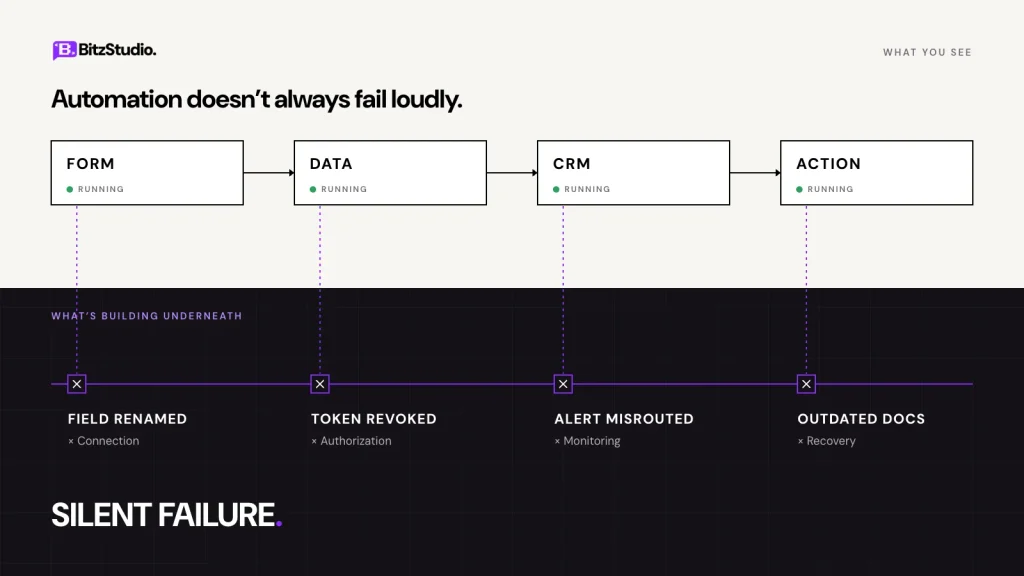
Automations rarely break on day one. They break the first time reality moves, and reality moves fast in a live business.
The first change breaks it. Someone renames a column in the intake sheet from “Phone” to “Phone Number.” Someone archives a CRM field nobody thought was in use. The workflow does not throw a dramatic error. It just stops mapping data correctly, and the symptom surfaces two weeks later as missing records.
Nothing was ever really transferred. Connections still run on the builder’s personal login. Keys belong to accounts the client cannot see. Nothing looks wrong until that person’s seat is removed, at which point the authorisation token is revoked and the workflow halts in silence.
Nobody is listening when it fails. Alerts were pointed somewhere convenient during testing and never repointed, so the system has been failing politely for eighteen days into a mailbox no one reads.
The documentation cannot be used under pressure. A forty-page PDF written for a developer does not help the office manager who hits the first failure at 9am. Thoroughness is not the same as usability.
There is one more reason worth naming honestly. Handover time is usually not in the quote, so the work gets squeezed into the last afternoon of the project. That is a pricing problem wearing the costume of a quality problem.
What a Complete Automation Handoff Contains
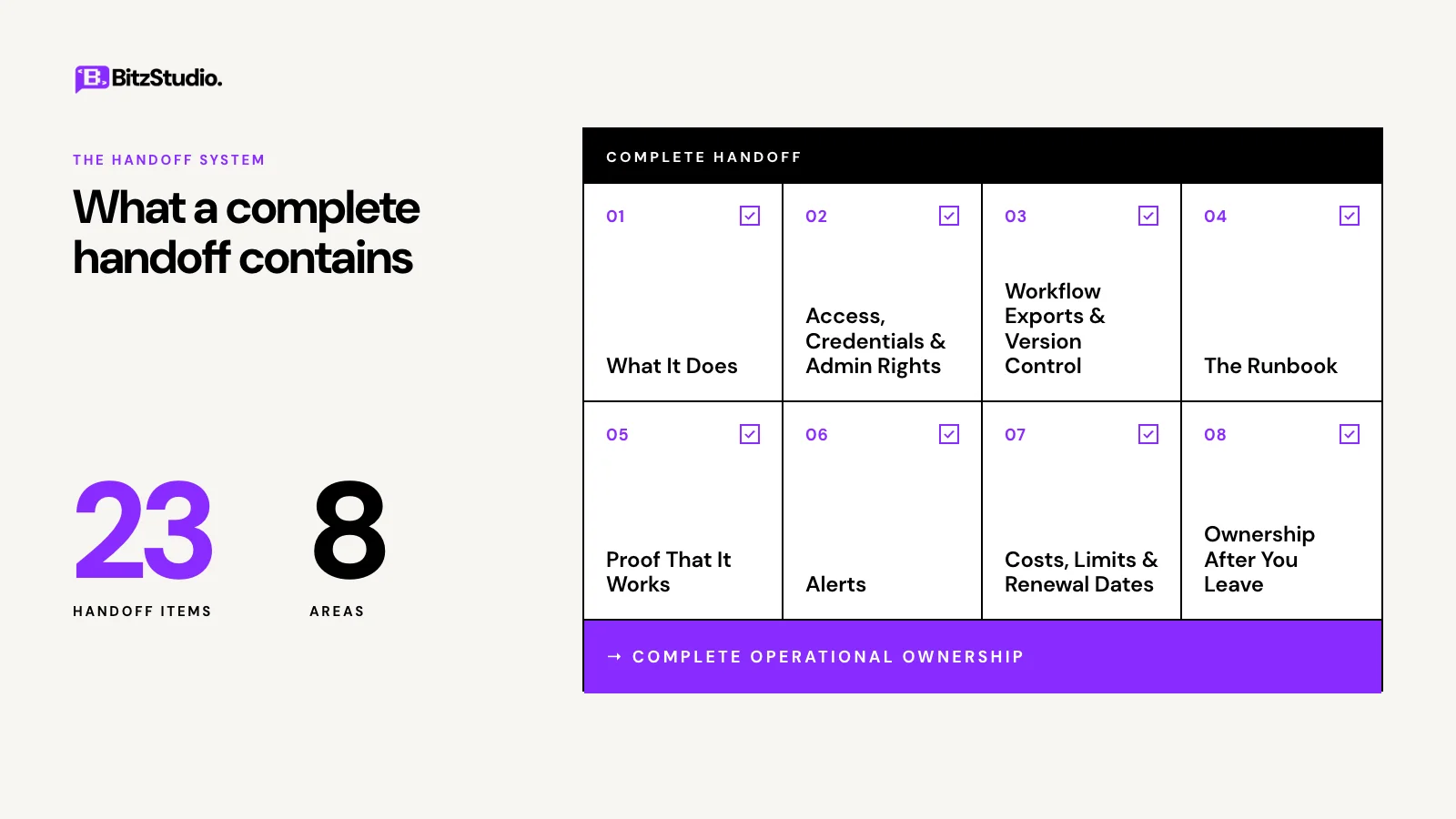
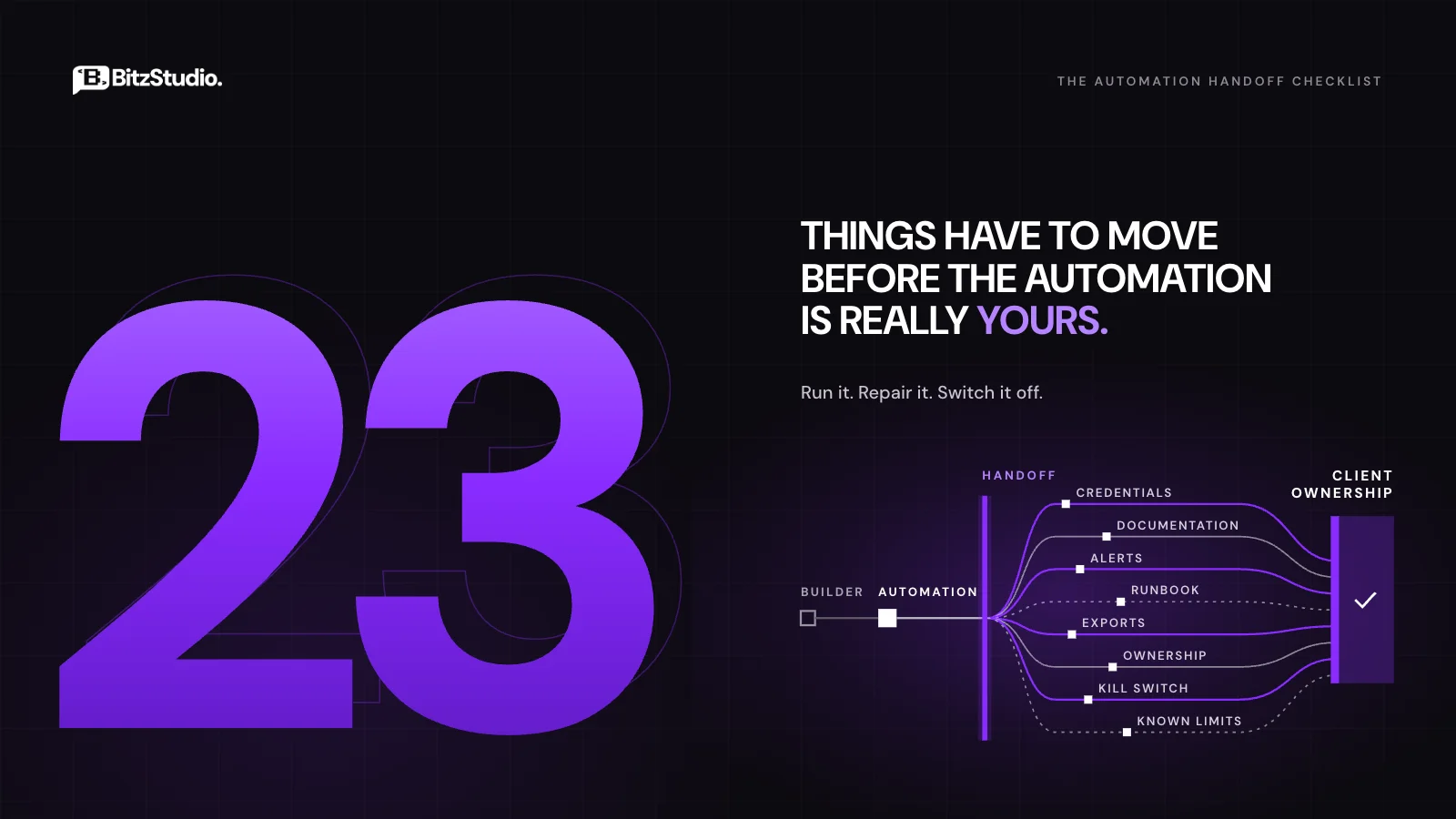
Below are twenty-three items grouped into eight areas. Each one has a short description and a line on how to verify it, because a checklist you tick without testing is just a list of good intentions.
What It Does, in Plain Language
1. A plain-language description of every workflow.
One short paragraph per automation covering what triggers it, what it produces, and which systems it touches. No platform jargon.
How to verify: hand it to someone who was not in the project and ask them to explain the workflow back to you.
2. An architecture map.
A visual showing triggers, actions, branches and data flows. A paragraph of text is not a map. The client should receive an editable copy, not only a flattened image. At its simplest it looks like this:
Webform submission (trigger)
→ validate required fields
→ valid → create CRM contact → create deal → notify #sales
→ invalid → log to review sheet → alert #ops-alerts
→ send confirmation email
How to verify: trace one real record from entry to final destination using only the map.
3. A walkthrough video.
Five to ten minutes of screen recording covering the backend logic and where the monitoring dashboard lives. This supports the written documentation rather than replacing it.
How to verify: the video shows the production account, not a demo environment.
Access, Credentials and Admin Rights
4. A complete account inventory.
Every platform and integration the automation touches, with the plan tier, the account holder, and the current transfer status for each.
How to verify: count the connections inside the workflow and confirm the inventory has the same number.
5. Fresh API keys generated from the client’s account.
This one trips up almost everyone. API keys are bound to the account that created them rather than to the workspace, so transferring ownership does not carry the key across. The correct move is to generate new keys from the client’s own account and swap them in before sign-off.
How to verify: run the workflow once after the swap, with the old key already revoked.
6. Connections on service accounts, not personal logins.
Google, Microsoft and Slack connections authorised through an individual’s login will die the moment that person leaves. A service account or a shared operations account survives staff changes.
How to verify: check the authorising email on each connection. If it is a human’s name, it is a liability.
7. Credentials delivered through a shared password vault.
1Password, Bitwarden or equivalent, with the client owning the vault. Not email, not Slack, not a spreadsheet. If a shared account uses two-factor authentication, the backup codes and the authenticator seed need a documented home.
How to verify: the client retrieves every credential without contacting you.
8. Admin rights confirmed by the client, not claimed by you.
Someone on the client side logs in and demonstrates that they can edit a workflow, pause it, and delete it.
How to verify: watch them do it during the handover session.
Workflow Exports and Version Control
9. Dated exports stored where the client controls them.
JSON exports of every workflow, saved in the client’s own Drive, repository or document store, named with the export date. Be explicit about one thing: these exports do not contain credentials.
How to verify: open the export file from the client’s storage, not yours.
10. The encryption key, for self-hosted builds.
If an instance runs on your own infrastructure, credentials inside an export are encrypted with the instance encryption key. Without that key, a restored backup is a shell. The key belongs in the vault alongside everything else.
How to verify: restore one workflow into a clean instance using only what you handed over.
The Runbook
11. One page per workflow.
What it does, what failure looks like from the business side, the first thing to check, and the second thing to check. Written for the person who will actually be at the desk when it breaks.
How to verify: a non-technical team member follows it unaided.
12. A written escalation path.
Who gets contacted, in what order, and after how long. Names and channels, not job titles.
How to verify: every name on the path knows they are on it.
13. Manual override steps.
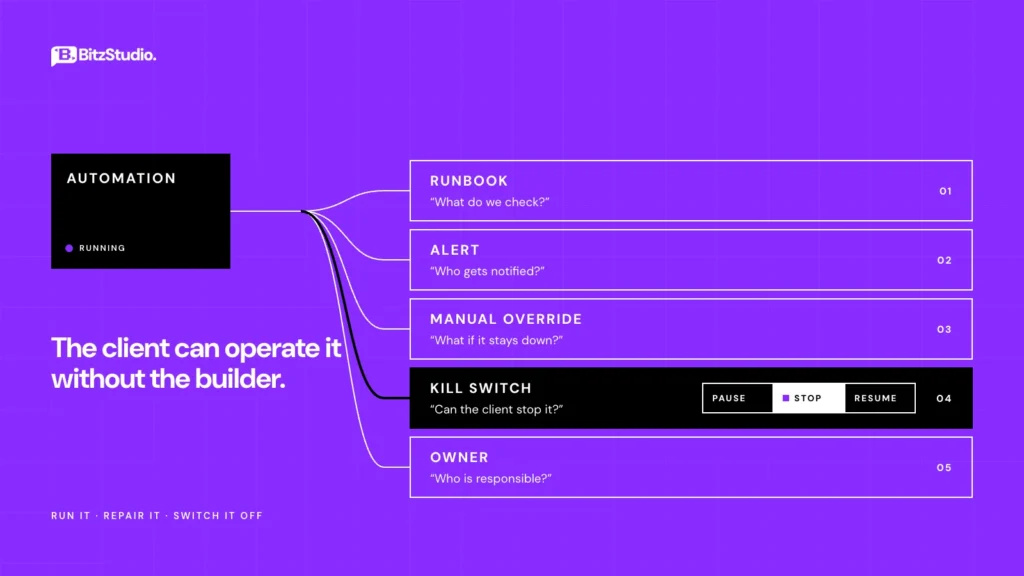
This is the item most handovers skip entirely. If the automation is down for six hours, how does the team do that work by hand? The business should never stop because a workflow did.
How to verify: someone completes one record manually using only the override instructions.
14. A named runbook owner and a review date.
Documentation rots. Put a human name and a last-reviewed date at the top of every runbook so the decay is visible.
How to verify: the owner has confirmed in writing that they accept the role.
Proof That It Works
15. Acceptance test evidence.
Not a verbal “it is working.” A short record of what was tested and what happened, covering the awkward cases: incomplete submissions, malformed input, and duplicate entries. Duplicates deserve particular attention, because retry logic without an idempotency key quietly creates them.
How to verify: the evidence includes at least one deliberate failure and the system’s response to it.
16. A written list of known limitations.
What the build cannot handle. Attachments over a certain size, records in other languages, scenarios that were ruled out of scope. This is different from the manual steps in item twenty-one. Those are tasks that remain. These are walls the automation will hit.
How to verify: the client reads the list aloud at sign-off and nobody is surprised.
Alerts That Reach a Person Who Will Act
17. Error routing to a shared destination with a named owner.
A shared inbox or a dedicated Slack channel, never a single person’s email. Pair the channel with one named stakeholder accountable for responding.
How to verify: trigger a real failure and confirm the alert lands where it should.
18. A check for silent success.
The nastiest failure mode is a workflow that reports green while processing nothing. Zero rows, empty payloads, an API returning an empty array instead of an error. Build a condition that alerts on suspiciously empty runs, not only on crashes.
How to verify: feed it an empty data source and confirm somebody hears about it.
Costs, Limits and Renewal Dates
19. Plan tiers, quotas and overage behaviour.
Zapier counts tasks. Make counts operations. Both have ceilings, and both behave differently when you reach them. The client needs the ceiling, the current consumption, and what happens at 100 percent.
How to verify: pull last month’s usage figure and put it in the document.
20. Billing owner and renewal dates.
Which card is on file, who receives the invoice, and when each subscription auto-renews. Automation budgets get quietly forgotten until a card declines.
How to verify: the finance contact has the dates in a calendar, not in a PDF.
Ownership After You Leave
21. The list of work that is still manual.
Approvals, exceptions, the Friday reconciliation someone still does by hand. Teams assume everything was automated unless you tell them otherwise, and that assumption creates gaps nobody is watching.
How to verify: walk the process end to end and mark every point a human touches it.
22. A kill switch the client can use alone.
Can they turn it off without calling you? Treat this as pass or fail. A client who cannot stop their own automation does not own it yet.
How to verify: they pause it and restart it in front of you.
23. Maintenance ownership and a written sign-off.
Who handles troubleshooting, who handles enhancements, and what support is covered until which date. Then the client confirms in writing that they accept operational ownership. This protects them from ambiguity and protects the builder from an open-ended support obligation nobody priced.
How to verify: the sign-off is signed and both parties hold a copy.
The Ownership Matrix
Of everything in this list, one artefact keeps earning its place months after the project closes. It is a simple table, and its job is to end arguments before they start.
Fill it in during the handover session rather than before it, with the client in the room. The act of filling it in is what surfaces the connection nobody remembered. Below is a worked example from a three-workflow lead intake and invoicing build, so you can see the level of detail each cell needs.
| Item | Platform or account | Owner before | Owner after | Transferred on | Verified by |
| Automation platform account | Make, Teams plan | Builder workspace | Client ops workspace | 12 Mar | R. Patel, edited a scenario live |
| Third-party integrations | HubSpot, Stripe, Slack, Google Sheets | Builder personal logins | Client service accounts | 13 Mar | All four re-authorised, test run passed |
| API keys | Stripe live key, Twilio | Builder-generated | Regenerated from client accounts | 13 Mar | Workflow ran after old keys revoked |
| OAuth connections | Google Workspace, Slack | Builder’s Google login | automation@client service account | 13 Mar | Authorising email checked per connection |
| Hosting or VPS | Hetzner, self-hosted n8n | Builder account | Client account, billing moved | 14 Mar | D. Shaw confirmed SSH access |
| Domain | automations subdomain | Builder DNS | Client registrar | 14 Mar | Client edited a DNS record |
| Password vault access | 1Password shared vault | Builder-owned vault | Client-owned vault | 14 Mar | Client retrieved 3 credentials unaided |
| Documentation storage | Google Drive folder | Builder Drive | Client Drive, ownership transferred | 11 Mar | Client opened runbooks and exports |
| Billing method | Make, Hetzner, Twilio | Builder card | Client card, finance contact set | 14 Mar | M. Oyelaran received first invoice |
| Alert destination | Slack #ops-alerts | Builder email inbox | #ops-alerts, owner R. Patel | 11 Mar | Test failure triggered, alert received |
| Workflow exports | 3 JSON files, dated | Builder machine | Client Drive | 11 Mar | One export restored to a clean instance |
Platform-Specific Gotchas
Generic advice stops being useful at exactly the point where platforms start behaving differently. These are the details that cause real incidents.
Zapier
Task limits are the usual surprise. Confirm the plan tier, last month’s task count, and what the account does when the limit is reached. Check whether Autoreplay is enabled, because a client who assumes failures retry automatically will behave very differently from one who knows they do not.
Zapier also deprecates older versions of its app integrations. A Zap running on a version due for retirement works fine until the day it does not, so note the app versions in use. One last item: confirm the Zaps live in a team workspace rather than someone’s personal account, and that folder ownership moved with them.
Make
Operations quotas work like Zapier tasks but count differently, and a single scenario run can consume many operations. Record the monthly allowance and the typical burn rate.
Two Make-specific items deserve a look. Execution history retention varies by plan, which affects how far back anyone can investigate a problem. The incomplete executions queue also fills up quietly in the background, holding failed runs nobody has reviewed. Show the client where it is.
n8n (Self-Hosted)
Self-hosting shifts a whole category of responsibility onto whoever owns the server. Document who the VPS belongs to, who pays for it, and where backups are written.
The encryption key matters more than anything else here, as covered in item ten. After that, check the Docker image tag. An instance pinned to latest will pull a new version on the next restart, which is a breaking change waiting for an inconvenient moment. Pin the version, list the environment variables, and note any feature that depends on an enterprise licence.
Issues That Hit Every Platform
Webhook URLs change when a workflow is cloned or moved between accounts. The upstream system keeps posting to the old address and the data simply stops arriving, with no error anywhere.
Scheduled triggers run on whatever timezone the account is set to. When the build team sits in one timezone and the client sits in another, a report scheduled for Monday morning can fire on Sunday evening. Distributed teams hit this constantly, so set the account timezone to the client’s and test one scheduled run before you leave.
Then there is schema drift, covered earlier, and sandbox credentials. Test keys for payment and messaging providers have a habit of surviving into production. Search the workflow for them before sign-off.
If You Are the Client: What to Demand Before They Leave
The rest of this article has been written from the builder’s side. This section is for you, the person paying for the work.
Ask for these before the final invoice is settled. Owner-level access to every account, with your own login tested in front of you. Fresh API keys issued from your accounts. Exported copies of every workflow in your own storage. A one-page runbook per automation in language your staff can follow. Error alerts arriving in a channel your team actually watches. The list of known limitations. The costs and renewal dates. And a confirmed way to switch the whole thing off.
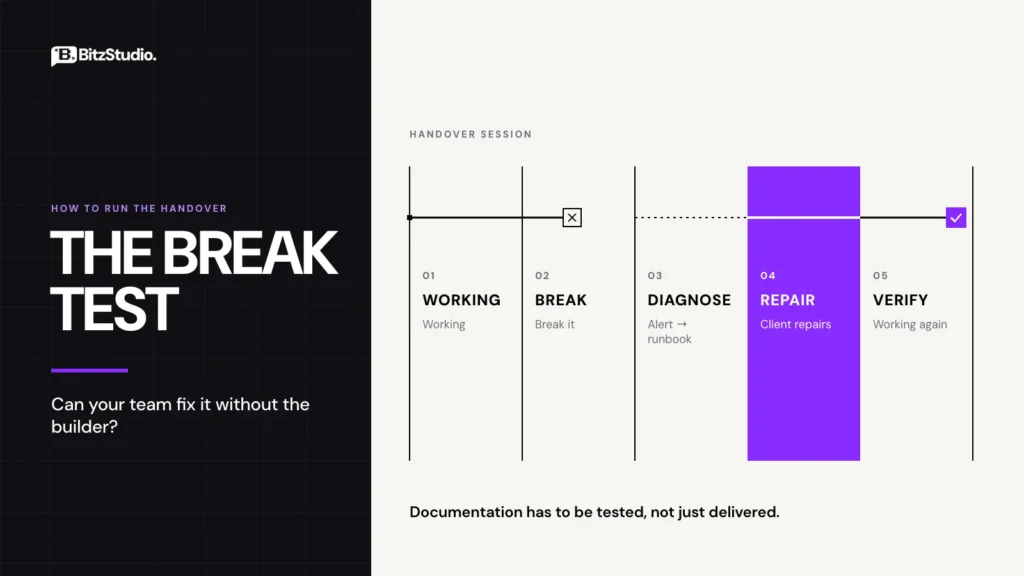
Then run one test, and let it decide everything. Could someone on your team fix the most likely failure on a Monday morning without calling the person who built it? Pick the failure you consider most probable, break it deliberately during the handover session, and watch one of your own people repair it using the runbook. If they cannot, the handover is unfinished regardless of how good the build is.
If You Are Taking Over From an Unresponsive Vendor
This situation is more common than anyone admits, and the first hours matter. Start with an ownership audit: log into every platform you can reach and check who holds the admin role on each account.
Next, rotate credentials. Generate new API keys from your own accounts and revoke anything tied to the previous vendor, starting with connections authorised through their personal logins. Finally, export every workflow you can before access changes under you. Even an export you cannot read yet is worth having, because it preserves logic somebody else can rebuild from.
Write the Handoff Into the Scope on Day One
Documentation delivered as a goodwill gesture at the end of a project will always be the thing that gets cut when the timeline tightens. Make it a line item instead, with hours attached, agreed before the build starts.
Four things belong in the contract. Intellectual property assignment, so ownership of the work is unambiguous. An obligation to transfer credentials and access. Transition assistance, defined with a scope and a duration. And a clause covering the return or deletion of client data when the engagement ends.
One point surprises people on both sides: payment does not automatically transfer ownership of the work. In the United States the work made for hire doctrine covers a narrow set of circumstances and applies to employees in most cases, which means contractor-built systems usually need an explicit written assignment to change hands. Have your own counsel confirm the wording, and get it signed rather than assumed.
Regulated clients need more. If the automation touches protected health information, the handover pack should include the data flow, retention settings and an access list, and a business associate agreement needs to be in place. Organisations preparing for a SOC 2 audit will be asked to produce these same artefacts for every system that moves data, so a well-documented handover ends up doing double duty.
How to Run the Handover Session
Keep it to forty minutes and run it only after the documentation and exports have been delivered, ideally three days earlier. The meeting is for verification, not for discovery. If people are reading the runbook for the first time in the room, the session has already failed.
First ten minutes: access. The client logs in to each platform themselves and opens one workflow in edit mode. The ownership matrix stays on screen and gets filled in live, one row at a time. Any blank row is assigned an owner and a date before anyone moves on.
Next fifteen minutes: the break test. Deliberately break one workflow, usually by revoking a connection or renaming a field, and have a member of the client’s team repair it using the runbook alone. The builder stays quiet. This is uncomfortable for about four minutes, and it is the most valuable part of the session, because it turns documentation from a claim into a demonstrated fact.
Last fifteen minutes: close it out. Walk the limitations list, confirm costs and renewal dates, have the client demonstrate the kill switch, and sign the handover off. Before anyone leaves, put a thirty-day check-in in both calendars. That check-in catches the problems that only appear once real volume has moved through the system.
Frequently Asked Questions
What should an automation handover include?
Access to every account, fresh credentials in a shared vault, exported workflows, a one-page runbook per automation, error alerts routed to a monitored channel, a list of known limitations, cost and renewal details, and a written sign-off. The practical test is whether the client’s team can operate and repair the system without the builder.
Who owns the automation after the project ends?
Whoever the contract says owns it. Payment alone does not transfer intellectual property from a contractor, so ownership of the workflow logic, the documentation and the accounts should be stated explicitly in writing before work begins. Where no clause exists, the parties often disagree, and the disagreement surfaces at the worst possible moment.
Is a retainer the same thing as a handover?
No, and treating them as interchangeable is how clients end up locked in. A handover transfers ownership and the ability to operate the system independently. A retainer is an ongoing service you may choose to buy afterwards. You should be able to decline the retainer and still run your automations.
How long should post-handover support last?
Two to four weeks of bug fixing is a reasonable norm for a straightforward build, covering defects rather than new requirements. Put the end date and the definition of a defect in the contract. Schedule the thirty-day check-in separately, because issues that only appear under real volume take weeks to show up.
What if the automation breaks after the developer has left?
Start with the runbook and the escalation path if you have them. If you do not, check the connections first, since expired tokens and revoked logins cause most silent stoppages. Then audit account ownership, rotate the credentials you control, and export the workflows before access changes further.
What are the known limitations I should ask for before sign-off?
Ask what inputs the automation rejects, what volume it has been tested at, which edge cases were ruled out of scope, and what happens when an upstream service is unavailable. Request the answers in writing. A builder who cannot list the limitations has probably not tested the boundaries.
Closing
A handover is finished when the people who use the automation can run it, repair it and switch it off without the people who built it. Everything in this checklist exists to make that sentence true rather than hopeful.
If you are commissioning the work, use the twenty-three items as your acceptance criteria and insist on the break test. If you are delivering it, price the handover properly and treat it as part of the build.
The same discipline runs through how we close our custom software development projects, and it applies just as directly to the access and credential transfers that come with WordPress development work. If you want a second pair of eyes on a system you inherited or one you are about to hand over, get in touch.