
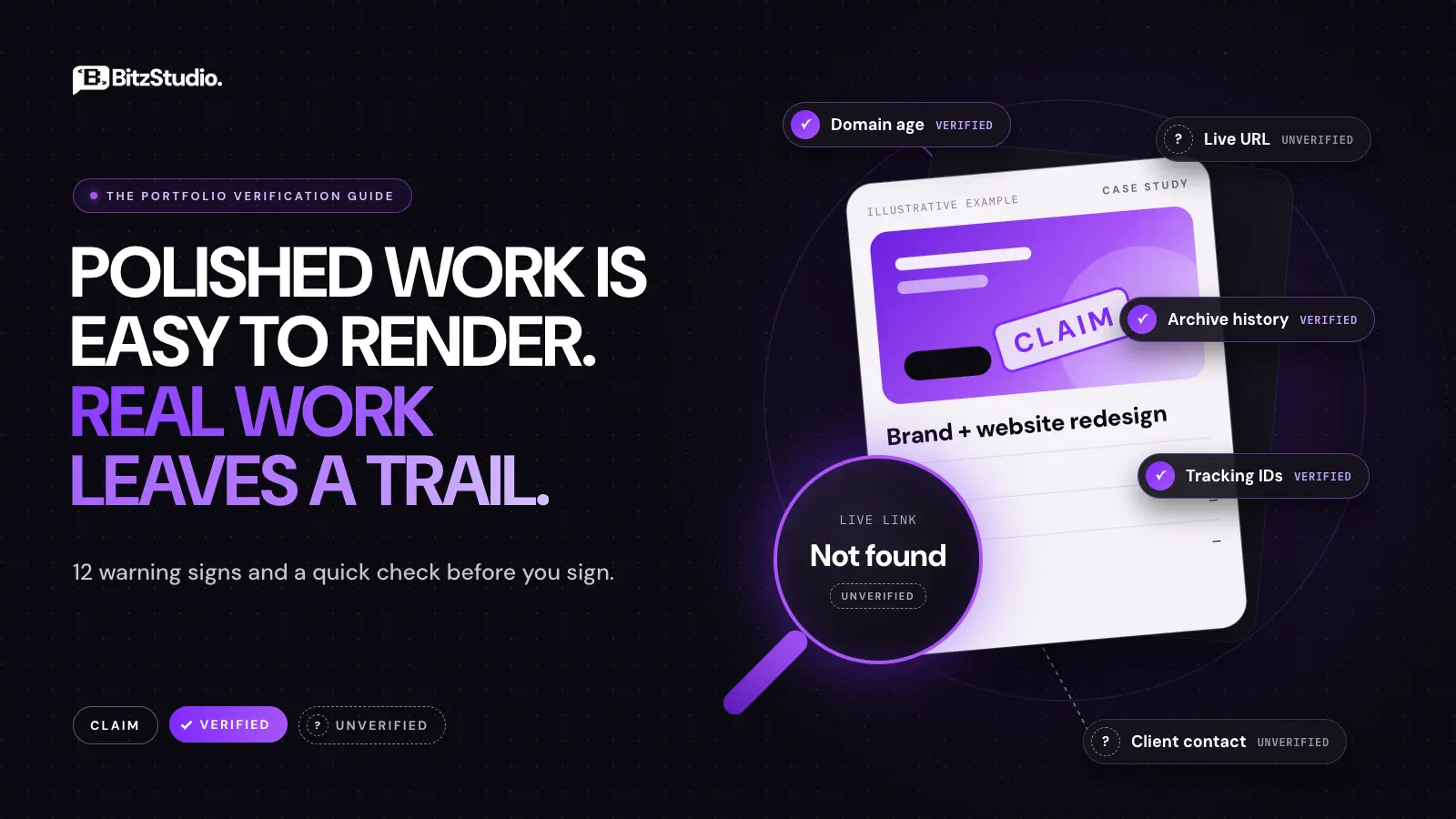
A beautiful agency portfolio used to signal proficiency and experience. Today, convincing website mockups, brand identities, and even case studies can be generated without a single paying client.
This makes hiring harder. How can you tell whether the agency behind that polished screen can actually deliver your project?
The goal is not to completely avoid AI. A skilled team may use it for imagery, ideas, or prototypes. The problem arises when fictional work is presented as completed client projects. This guide explains how to spot an AI-generated agency portfolio, outlines 12 warning signs, and gives you a practical 10-minute check before you sign a contract.
Why AI-Generated Agency Portfolios Matter in 2026
AI tools can create product photography, app screens, team portraits, and persuasive project descriptions quickly. But a visual that resembles a finished product doesn’t prove that a working product exists.
It helps to separate three types of work:
- Concept work: A fictional project used to demonstrate design skill, clearly labeled as a concept.
- AI-assisted client work: A genuine client engagement in which people use AI within a real design or development process.
- Fabricated client work: Imaginary clients, outcomes, or deliverables presented as actual commercial projects.
The first two can be legitimate. The last one misrepresents experience and is wrong.
When hiring an agency, attractive visuals are only the starting point. Client feedback, responsive behavior, accessibility, performance, content management, and launch support are what matter most. A static mockup fails to demonstrate these abilities.
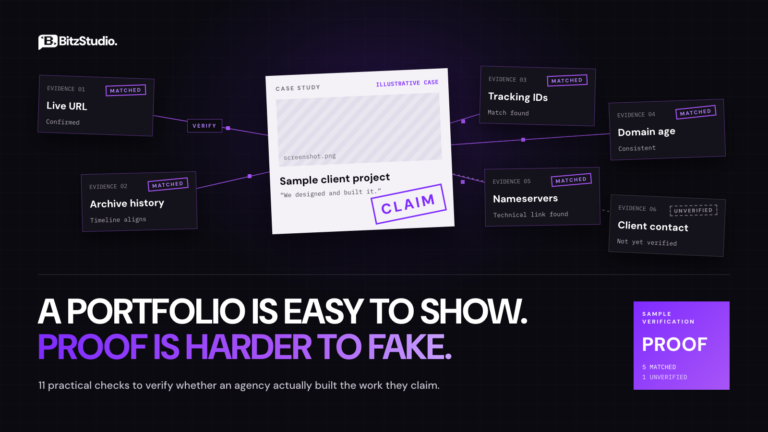
The practical answer: to spot an AI-generated portfolio, check whether the clients and projects exist. Inspect the deliverables, request evidence, and ask questions about unsupported results.
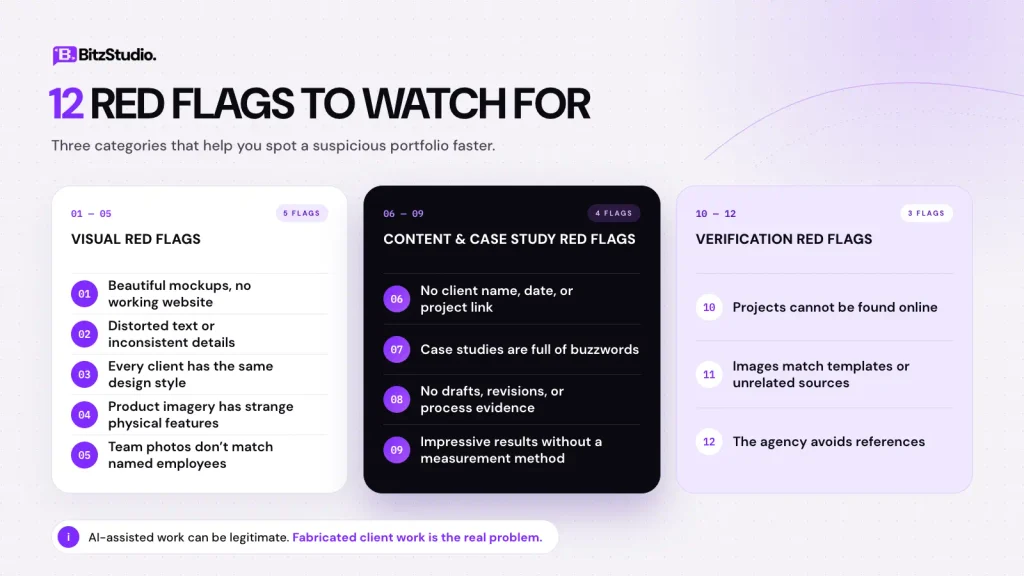
12 Red Flags of an AI-Generated Agency Portfolio
One warning sign on its own proves very little. The flags below are grouped by where you’ll notice them, starting with the visuals, then the case study copy, then what happens when you try to verify the work.
Visual Red Flags
Start with what you can see. These five clues show up in the images and mockups themselves.
1. Beautiful Mockups but No Working Websites
The projects appear on floating laptops, phone screens and billboards, but none links to a live website.
Mockups are presentation tools. They become concerning when they are presented as proof that a functioning website was developed. A mockup cannot demonstrate navigation, checkout forms, or responsive layouts.
How to check: Open the live URL on mobile or desktop. If no site has launched, ask whether the work was a concept, a prototype, or a delivered project.
2. Distorted Text and Inconsistent Details
Zoom into packaging labels, navigation menus, signage, and app screens. Some generated images contain nonsense words, uneven icons, or text that changes between views.
Treat these as clues to verify, not proof. Compression, placeholders, and experimental design choices can also create odd details.
How to check: Request the original design files and compare them with high-resolution images.
3. Every Client Has the Same Design Style
A skincare brand, finance platform, and construction company all use identical gradients, oversized headings, and lighting effects.
Agencies may have a recognizable aesthetic, but different audiences should produce different design decisions. Repeated visuals usually suggest prompt variations.
How to check: Choose three projects in different industries and ask why the layouts, typography, and content structures fit their users.
4. Product Images Have Strange Physical Features
Watch for inconsistent reflections, altered logos, duplicate objects, implausible product edges, and packaging that changes shape between images.
Appearance alone cannot establish how an image was made. Professional photography and CGI can look artificial, while modern AI output can look completely real.
How to check: Compare multiple views of the same product. Ask whether the imagery came from photography, CGI, or generative AI.
5. Team Photos Don’t Match Named Employees
The website displays an impressive team, but the agency cannot say who will actually handle your work.
Stock or generated team imagery isn’t necessarily dishonest if labeled appropriately. The issue is claiming an invented team or disguising the people responsible for delivery.
How to check: Look up the agency’s named leaders on LinkedIn and ask to meet the designer or developer who would work on your project.
Content and Case Study Red Flags
Next, read the case studies closely. Weak or missing details often say more than the visuals do.
6. No Client Name, Date, or Project Link
A case study claims a successful redesign but never identifies a client, launch date, or working product.
Confidentiality can often explain missing information, since clients sometimes prohibit public attribution. Even so, the agency should be able to explain the scope, its responsibilities, and the evidence.
How to check: Search the company name. If an NDA applies, ask for a verifiable project or other appropriate evidence.
7. Case Studies Are Full of Buzzwords
Phrases such as “transformative digital experience” and “innovative user-centric solution” don’t explain what was actually done.
Useful case studies identify the original problem, constraints, decisions, and deliverables. Compare “we improved engagement” with “we reduced the checkout from six screens to three and tested the revised mobile flow.” The second is specific enough to question and verify.
How to check: Ask what was broken before the project and how it was fixed.
8. No Drafts, Revisions, or Process Evidence
Real projects normally involve alternatives, feedback, iterations, and tests. A final design alone hides all that work.
Agencies don’t keep every sketch forever, and not every client permits sharing source files. Still, a credible team should be able to explain its process and show examples.
How to check: Request a walkthrough of early Figma layouts, revision notes, responsive designs, staging screenshots, or test records from one comparable project.
9. Impressive Results Without a Measurement Method
“Conversions increased 300%” is meaningless without knowing the starting figure, measurement period, and other changes affecting performance.
Even real results can be misleading, and fictional case studies can produce plausible statistics instantly. You don’t need access to confidential analytics to ask sensible questions.
How to check: Ask which metric was measured, the baseline, the timeframe, and how the agency assessed its contribution. Treat unsupported figures as unverified.
Verification Red Flags
The last group appears when you try to confirm that the work is real.
10. Projects Cannot Be Found Online
Featured brands don’t appear in search results, project links are broken, or every example lives on a temporary preview URL.
Sometimes real sites are retired, removed or redesigned. Development subdomains are normal during a build. The concern is a repeated inability to show what was launched and when.
How to check: Search the client and project name, request the production URL, and ask for dated launch evidence when a site is no longer available.
11. Images Match Templates or Unrelated Sources
Reverse image search may show that a supposedly original hero visual appears in a stock library or a template used by another company.
It is not inherently wrong to use licensed assets. Claiming that purchased artwork was custom-created is different. Also, an image with zero search matches isn’t proof that it was AI-generated.
How to check: Use Google Lens or TinEye on distinctive images and compare the results with the agency’s claims.
12. The Agency Avoids References
You ask to speak with a recent client. The answer keeps changing, and no verification for the work is offered. Some clients decline reference calls, so one refusal isn’t proof of deception. Repeated evasiveness about clients, project ownership, or deliverables deserves closer attention.
How to check: Request one reference from the past 12 months, preferably for similar work. If a call isn’t possible, ask for approved testimonials or other independently checkable evidence.
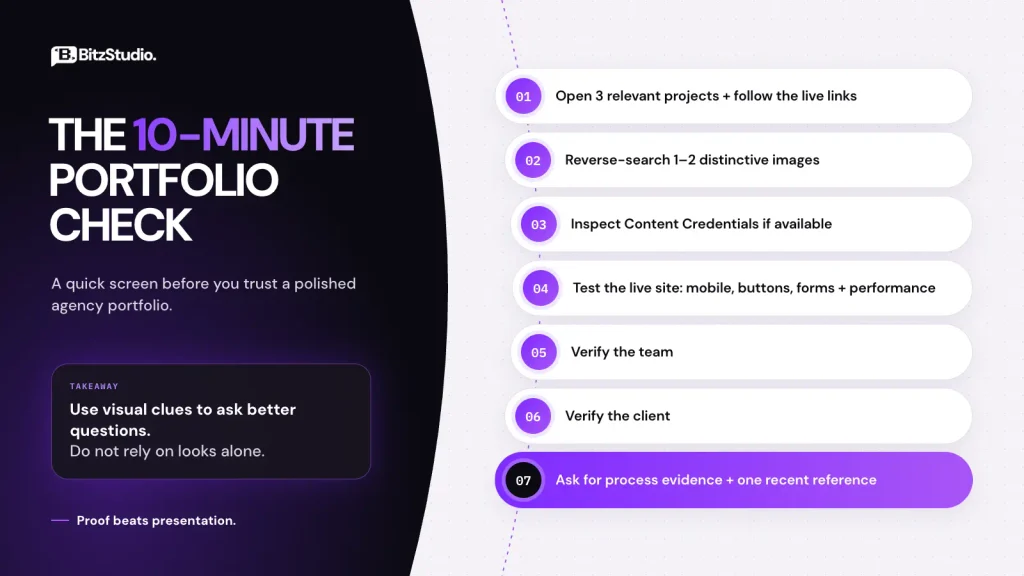
The 10-Minute Agency Portfolio Check
A technical background is not required to screen a shortlist. Spend approximately ten minutes on these seven steps before arranging a deeper discussion.
- Minutes 1–2: Open three projects. Choose relevant examples and follow their live links. Verify whether each site exists and whether the work is labeled as launched or conceptual.
- Minute 3: Reverse-search images. Use Google Lens or TinEye to check one or two distinctive visuals. A match calls for clarification, not an automatic rejection.
- Minute 4: Inspect content credentials. Where an original file is available, try Content Credentials Verify. Provenance information may reveal part of an image’s creation history; missing credentials prove nothing.
- Minutes 5–6: Test a live website. Try mobile navigation, buttons, and forms. Review PageSpeed Insights for performance signals. Remember that later client changes and hosting can affect scores.
- Minute 7: Verify the team. Check the agency’s named leaders and confirm who will actually design, develop, and manage your project.
- Minute 8: Verify the client. Search for the business and see whether its public presence fits the case study. Respect legitimate confidentiality restrictions.
- Minutes 9–10: Ask for evidence. Request a recent reference and a walkthrough showing the brief, revisions, and delivery.
A ten-minute check can’t establish the full truth, but it can show which agencies deserve additional diligence, especially when the contract is significant. For deeper technical checks such as footer credits and WHOIS history, see how to verify an agency actually built its portfolio.
Four Questions to Ask on the First Call
“Can you explain how this project went from brief to launch?”
Good answer: An explanation of where AI assisted and what people reviewed, redesigned, tested, or delivered.
Red flag: Contradictory explanations or refusal to clarify whether an advertised project was real.
“Can I see an early draft or Figma revision?”
Good answer: An appropriate process example, with confidentiality respected.
Red flag: No ability to justify how any showcased work developed beyond the finished images.
“Can I speak with a recent client?”
Good answer: A suitable reference or reasonable alternative evidence.
Red flag: Every project is unverifiable, with no clear explanation.
“Who will actually work on my project?”
Good answer: Named responsibilities, an understandable workflow, and a clear point of contact.
Red flag: Sales claims about expertise that cannot be connected to the delivery team.
If you’re comparing partners more broadly, our guide on how to choose a software development agency covers additional hiring considerations.
AI-Assisted vs. AI-Faked: What Honest Agencies Show
| What to examine | Honest AI-assisted work | Fabricated portfolio work |
| Project origin | Real client or clearly labeled concept | Invented client presented as genuine |
| AI involvement | Relevant use explained | Important facts concealed or misrepresented |
| Design process | Decisions, revisions, and deliverables can be discussed | Only polished images are offered |
| Live product | Launch status is clear | Mockups imply a launch that never happened |
| Outcomes | Metrics have context or are labeled unverified | Results are asserted without evidence |
| People and references | Responsibilities and appropriate verification are available | Ownership and references stay vague |
A project that uses AI assistance isn’t any less real. Imagine a retail website where AI helped generate early image concepts, designers refined the approved Figma screens, and developers built, tested, and launched the store. That is client work.
Now imagine a team creating fictional product images and interface screens, then claiming they launched the store and doubled its sales. That is a fabricated case study, even if the visuals are excellent.
The important question isn’t “Was AI used?” It’s “What work actually happened, and what can the agency demonstrate?”
Can AI Detectors Tell Whether a Portfolio Is Fake?
Not necessarily. Image detectors can produce false positives or miss generated material, especially after editing, cropping, or compression. They also cannot establish whether the business relationship described in a case study ever happened.
Content Credentials may provide useful provenance for compatible files, but absence of metadata is not evidence that something was generated. Similarly, a reverse image search identifies possible sources; it doesn’t establish who built a website.
Use a stronger evidence order: verify the client, confirm the agency’s contribution, review process evidence, and then use image analysis tools. This approach also avoids unfairly accusing legitimate designers based on a visual guess.
How BitzStudio Shows Its Work
At BitzStudio, we work on websites, UI/UX design, custom software, and digital products for clients across industries. Our published project examples include Lockr, Super Auto Haul, Go Chicken Go, Paying 4, and Sakaem.
We believe a prospective client should be able to ask what was built, who handled the work, which tools were involved, and what reached delivery. Those questions apply to our portfolio as much as anyone else’s.
When reviewing our work, use the same checks recommended above. Ask for relevant examples and clarify which records or references can be shared. A transparent conversation is more useful than taking polished visuals at face value.
Frequently Asked Questions
Can AI detectors prove an agency portfolio is fake?
No. Detectors provide clues, not conclusive proof. Verify clients, deliverables, and references before drawing conclusions.
Is it bad for a design agency to use AI?
No. AI-assisted workflows and clearly labeled concepts are legitimate. The problem starts when AI-generated imagery or concept work is presented as completed client work.
How do I verify an agency case study?
Find the client or live project, ask exactly what the agency delivered, review suitable process evidence, and request a recent reference.
What is the biggest portfolio red flag?
A claimed client project that cannot be traced to a genuine engagement or supported with a reasonable explanation and evidence.
Should agencies disclose AI use?
AI involvement should be explained when it affects how clients understand a showcased deliverable, especially when concept work might be mistaken for a real commission.
Can a portfolio be real but misleading?
Yes. An actual design may never have launched, or an agency may exaggerate its contribution to a project built mainly by others.
Before You Sign: Three Checks That Matter
A polished portfolio demonstrates presentation ability. It doesn’t automatically establish delivery experience.
Before choosing an agency, confirm that the project existed, understand who did the work, and request evidence of the process. Use visual AI clues to guide questions, not to reach unsupported conclusions.
If you’re evaluating a design or development partner, explore BitzStudio and get in touch to discuss a relevant project. You should be able to evaluate the work behind the images before making a commitment.